
PlaceMaker Route Planner
Resting CranesMaps & Navigation
3.852.00 Reviews
- Version
- 1.0.126
- Installs
- 50.00K
- Age Rating
- Everyone
Screenshots
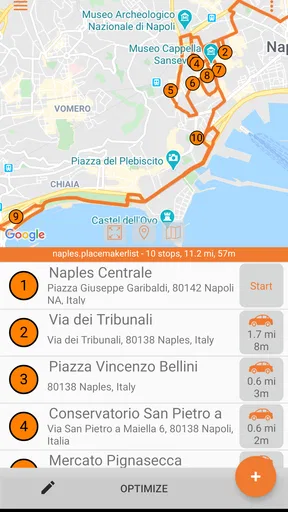
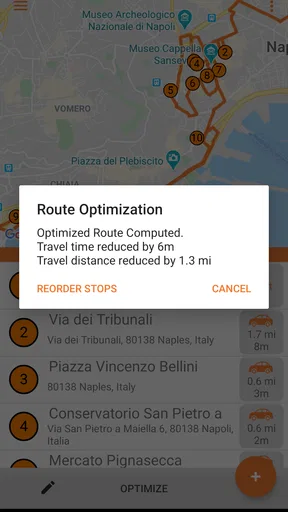
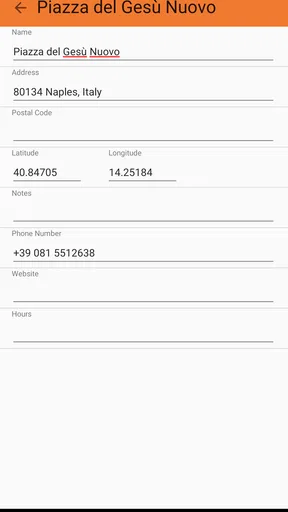
Our Review of PlaceMaker Route Planner
 Analysis by Appyee
When I decide whether to trust a route-planning app, I look beyond how neatly it draws a line on a map. I want to know what choices it gives me, when I would need to share location or destination details, and whether it fits the way I actually travel. PlaceMaker Route Planner is a Maps & Navigation app from Resting Cranes, and its focus is clear: organizing journeys with several stops. It is free to install, has a 3.8 average from around 200 ratings, and has passed 50,000 installs. Those figures suggest it has found an audience, though they don’t tell me whether its route calculations will suit every trip.
What I would check before planning a sensitive trip
Addresses can reveal a lot: a customer’s home, a medical appointment, or the places someone visits in a workday. I treat any route list containing that sort of information as sensitive, whether I’m using a dedicated planner or a familiar map app. Before entering a detailed itinerary, I would check the app’s current permission prompts and privacy information, and consider whether each requested access is necessary for the task I have in mind.
I also wouldn’t assume that an app’s ability to accept destinations means those destinations stay only on my phone. That depends on its data practices, which I would want to review directly before loading private customer or household addresses. For casual errands, the stakes may feel low; for a work route, I’d be more careful about what I enter and who can see the device or account.
Keep control of the route, not just the destination list
A route optimizer can save effort, but its result is a suggestion rather than a promise that every stop is practical in the real world. I’d check the sequence before setting off, especially if some stops have opening hours, parking constraints, or a preferred arrival order. A short detour to collect a passenger, for example, may matter more than a small reduction in distance.
One useful habit is to separate the planning decision from the driving decision: build and review the route while parked, then follow navigation without handling the phone on the move. If plans change, I’d pull over before editing the stop list. That keeps the app in its proper role—a planning aid—rather than letting a predicted efficient route distract from road conditions or common sense.
Who benefits, and when I would choose something else
This kind of tool makes the most sense when I have a meaningful cluster of stops to organize. Someone visiting several clients or making a series of deliveries can benefit more from arranging the order in advance than a person driving to one familiar address. For a simple point-to-point commute, the map app already used for turn-by-turn directions may be quicker and easier.
I’d also be cautious about relying on any route planner as the sole source of live travel guidance. Traffic, temporary closures, and the realities of finding a legal place to stop can change the best plan after it has been made. If a trip depends on current road conditions, I would compare the proposed route with a navigation service I already trust and keep enough flexibility to adjust.
Getting Started with PlaceMaker Route Planner
Setting up PlaceMaker Route Planner was a breeze. After downloading it from the App Store, I was greeted with a clean and intuitive interface that seemed eager to get me on the road. The app doesn’t waste time with unnecessary tutorials – it’s straightforward and user-friendly, which is a win in my book.
Adding stops is super simple. You can manually enter addresses or import them from your contacts. One thing I appreciated was the ability to input multiple stops at once. This feature feels like a lifesaver when you’ve got a long list of destinations to manage. Plus, if you’re a fan of voice commands, the app supports that too, making it even easier to plan on the go.
Features That Stand Out
What really sets PlaceMaker apart are its standout features. Let’s dive into the ones I found most useful:
- Optimized Routes: This is perhaps the app’s pièce de résistance. It calculates the most efficient route for your stops, saving you time and fuel. I tested it on a day packed with errands, and it shaved off a good chunk of travel time.
- Real-Time Traffic Updates: The app integrates with live traffic data, so you’re always in the loop. It reroutes you if there’s a jam ahead, which is a huge plus when you’re on a tight schedule.
- Multiple Route Options: Depending on your priorities, whether it’s the shortest path or avoiding highways, PlaceMaker gives you options to tailor your route.
- Offline Access: This was a surprise! Even without a data connection, the app works smoothly. Perfect for those remote adventures where cell service is spotty.
User Experience and Interface
The user experience with PlaceMaker is genuinely enjoyable. The design is sleek, with a minimalist approach that doesn’t overwhelm. Navigating through the app is intuitive, thanks to well-labeled icons and menus. I particularly liked the map view, which provides a clear and concise overview of your entire route.
There’s also a nifty feature where you can categorize your stops. For example, you can label them as ‘business’, ‘personal’, or even create your own custom tags. This makes sorting through your destinations a breeze, especially if you’re managing different types of errands.
Making a multi-stop day easier to manage
A realistic use for me is a Saturday with a grocery pickup, a parcel drop-off, and two visits on opposite sides of town. I would enter the destinations together, inspect the suggested order, and decide whether the optimized sequence still makes sense around pickup times or a planned lunch break. The key benefit is not blindly accepting the shortest-looking route; it is seeing the day as one itinerary instead of repeatedly planning each leg from scratch.
For a workday with a changing list, I’d prepare the known stops before leaving and keep any uncertain address out until I can verify it. When a customer cancels, removing that destination and reviewing the remaining sequence is more useful than continuing with an obsolete plan. I would do that while parked, since quick edits at the curb can still become a distraction if traffic is moving.
Importing several addresses at once can save typing, but it also makes a quick review worthwhile. Similar street names, apartment numbers, and contact entries with old addresses are easy sources of a wrong turn. My practical tip is to check the map pins against the intended places before optimizing; route order cannot fix a destination that was entered incorrectly.
Planning choices and everyday trade-offs
Route efficiency is not always the same as convenience. A route that looks best on paper may involve awkward turns, difficult parking, or a busy road where I would rather avoid stress. I’d use the available route preferences to express the priorities that matter for that trip, then judge the result against the actual stops. If I’m carrying bulky items, for instance, the easiest place to park may matter more than shaving a little distance off the drive.
The same idea applies to categories and custom tags. I would use a small, consistent set—such as work, personal, and time-sensitive—rather than inventing a label for every destination. That keeps a long list easier to scan and helps me notice which stops can be moved. The trade-off is that sorting is only useful if I maintain the labels; a messy tag system can add another layer of work instead of reducing it.
Compared with ordinary navigation apps, a multi-stop planner is most valuable before the journey, when deciding how to group and order destinations. A standard map is often the simpler choice for one destination, familiar turn-by-turn guidance, or checking a place while already on the move. I see these tools as complementary: plan the sequence here, then use the navigation view or service that gives me the clearest guidance for the road ahead.
Fit, costs, and practical limits
The app is free to download and rated for Everyone. Its current version is 1.0.117, and optional in-app purchases range from $4.99 to $17.99 per item. I would try the free experience with a real but low-stakes set of stops before paying for anything. That gives me a chance to see whether the workflow suits my habits and whether the available route planning is enough for the way I travel.
Its average rating is 3.8 from around 200 ratings, so I would treat it as a useful option to test rather than assume it will be a perfect replacement for a navigation app I already rely on. The main friction for a new user is the need to check the route and destination details instead of treating optimization as automatic. People who only make occasional single-destination trips may not get enough value from maintaining a separate stop list.
PlaceMaker is a better fit for people who regularly coordinate several addresses and want a planned order before setting out. I would skip it if my main need were live navigation to one place, if I rarely make multi-stop trips, or if I need route decisions that depend on requirements the app does not visibly support. For a delivery worker, sales rep, or household managing a busy day, it can make the planning stage more orderly—provided the route is checked against time windows, access, and the day’s changing realities.
Who is PlaceMaker Ideal For?
If you’re someone who frequently finds themselves zigzagging across town, this app is a game-changer. Delivery drivers, sales reps, and road trip enthusiasts will find immense value in PlaceMaker. It takes the guesswork out of route planning, allowing you to focus on the journey rather than the logistics.
Even if you’re just running errands or planning a day out, the app’s ability to optimize routes and manage multiple stops is incredibly useful. It’s like having a personal navigator right in your pocket.
Final Thoughts
Overall, I’m genuinely impressed with PlaceMaker Route Planner. It combines practicality with ease of use, making it a must-have for anyone who values efficiency. Whether you’re managing a fleet or just trying to make the most of your day, this app is worth checking out.
So, if you’re ready to streamline your travels and make road planning a breeze, give PlaceMaker a spin. Who knew planning routes could be this fun and hassle-free?
Verdict
Strengths of PlaceMaker Route Planner
- Intuitive interface for easy navigation.
- Supports multiple stops for complex routes.
- Real-time traffic updates included.
- Offers offline map access.
- Integrates with popular navigation apps.
Limitations of PlaceMaker Route Planner
- Limited free version features.
- Occasional inaccuracies in route times.
- Can drain battery quickly.
- Subscription required for full access.
- No voice-guided navigation feature.
Similar Picks in This Category
View All
Uber - Request a ride
Uber Technologies, Inc.4.7


inDrive. Rides with fair fares
® SUOL INNOVATIONS LTD4.8

Yandex Go: Taxi Food Delivery
Mikromobilnost LLC Belgrade4.8

Bolt: Request a Ride
Bolt Technology4.8

Rapido: Bike-Taxi, Auto & Cabs
Rapido Bike Taxi4.8
Frequently Asked Questions
What platforms is PlaceMaker Route Planner available on?
PlaceMaker Route Planner is available on both Android and iOS platforms. Users can download it from the Google Play Store or the Apple App Store. Ensure your device meets the minimum system requirements for optimal performance. Regular updates are provided for enhanced functionality and user experience.
Does PlaceMaker Route Planner require an internet connection to function?
Yes, PlaceMaker Route Planner requires an internet connection to access real-time data, such as traffic conditions and map updates. However, it offers offline capabilities for pre-saved routes. Download necessary map data in advance if you plan to use the app in areas with limited connectivity.
Can PlaceMaker Route Planner optimize routes for multiple stops?
Absolutely. PlaceMaker Route Planner excels in optimizing routes with multiple stops, making it ideal for delivery drivers, sales representatives, or anyone needing to visit several locations efficiently. The app calculates the best possible order for your stops, saving time and fuel.
Is there a subscription fee for using PlaceMaker Route Planner?
PlaceMaker Route Planner offers both free and premium versions. The free version includes basic features, while the premium version provides advanced functionalities such as unlimited routes and enhanced optimization. Subscription options vary, so check the app for the latest pricing and features.
How user-friendly is the PlaceMaker Route Planner interface?
PlaceMaker Route Planner boasts an intuitive and user-friendly interface, designed for ease of use by both beginners and experienced users. The app offers a clean, straightforward layout with clear instructions and helpful prompts, making route planning a seamless experience.
